|
Midi Recording Studio
MIDI has received a lot of hype, but more and more people
are finding out, a new and fantastic world coming true.
The MIDI sequencer (also now as DAW (Digital Audio
Workstation) nowadays) has now made it possible to create
an entirely different kind of recording studio for
electronic music. As you play a melodic line on a MIDI
keyboard, the computer-based sequencer "records" what you
play and assigns this data to a track in the sequencer.
Much like you would do in a professional multi-track tape
recorder. You can build up multiple tracks, and on
playback, send this musical data to multiple MIDI slave
keyboards thus producing the same effect as if you had
multitracked the keyboards with a conventional multi-track
tape recorder. This sequenced composition can then be
mixed and recorded onto a conventional 2-track analog
recorder, or (for maximum fidelity) PCM adapter / VCR
combination to produce a master tape. Let's consider some
of the advantages of this approach.
- Top sound quality from first generation. What you hear
is the sound of the MIDI instruments, with no
intervening tape processes to degrade their clarity.
With MIDI, the multitrack tape recorder is an option,
not a necessity.
- No rewind time when working out compositions. Until
the final mixdown everything is stored in computer
memory for virtually instant access.
- Superb fidelity with zero loss when bouncing, no
matter how many times you bounce. After all, you're
bouncing computer data instead of sound.
- The ability to edit whatever you like from whole
sections to sixty-fourth notes of one instrument on one
track. Forget about the nuisances of such techniques as
the "window splice" (where, with tape, you splice a tiny
window out of a multitrack tape to eliminate one bad
note).
- Lower tape and maintenance costs. You don't have to
align the bias or azimuth of a MIDI sequencer, or oil
the motor, or worry about temperatures and humidity
extremes. (Well, this last two are not enterely true but
they are certainly more easy on a MIDI sequencer or DAW
than on a tape machine).
- Instantly change the sound of a track. Would that
violin sound better as a trumpet? Punch a few buttons
and find out, there's no need for re-recording.
- The MIDI recording studio or DAW, is the most exciting
development since inexpensive multitrack tape decks
became available in the mid-70s. Don't selI your
faithful multitrack recorder (yet); but if you were
considering upgrading to 16 or 24 tracks you might want
to reconsider. MIDI can help you upgrade your studio to
a lot more tracks for a lot less bucks, so let's see
exactly what the MIDI studio is alI about.
Elements needed
Picture yourself setting up a recording studio. The first
question that comes to mind is what do i need to build
one? Well, it's no hard to realize that first and foremost
you need an instrument and some media to record your
performances. Depending on your personal preferences,
style and proficiency degree you can go from fairly
affordable instruments to flagship instruments with all
the bells and whistles for professional use. So lets
review what do you need to make that recording studio come
true.
MIDI Instruments
As mentioned in the instruments
section, there are any king of instruments which have a
corresponding electronic midi version available. Choose
your favourite instrument based in the features and
characteristics of the device more appealing to you in the
price range you can afford. Remember your are setting up a
MIDI Recording Studio so any instrument you choose has to
have a MIDI interface in some form: DIN conector or USB.
The most important point to remember for any MIDI
instrument is that to be most effective in the MIDI
studio, the instrument should have as complete a MIDI
implementation as possible. You should at least be able to
receive, and preferably transmit, on all sixteen channeIs.
Being able to transmit a keyboard's velocity
(dynamics)information over MIDI is also very important,
because it lets you do your own "mix" as you play
(velocity keyboards are algo great for programming those
MIDI drum units that accept dynamic information).
In recent years a new king of "instrument" has been
around. It's know as MIDI controller. Though a not real
instrument (it doesn't make any sound per se), these
device (a keyboard in its most common form) allows to play
any virtual instrument from your computer recording
program (DAW). So if you have a DAW program with plenty of
these virtual instruments it might be better to buy one of
these controllers.
You'll also need a MIDI drum machine, hopefully one which
responds to velocity information and song data (i. e. the
drurn unit automatically switches to the desired song upon
command). Fortunately, though, many older non-MIDI drum
machines will work with MIDI sequencers that can send out
a drum-compatible clock pulse signal.
Again these drum machine can be a virtual drum machine
included in your DAW so the MIDI controller will be a more
advisable solution after all.
Once you're set with the instrument of your choice, it's
time to add the heart of the MIDI studio: a MIDI
sequencer.
The MIDI Sequencer or DAW
First let me explain the difference between a MIDI
sequencer and a DAW (Digital Audio Workstation). Both
start from the same base - record MIDI performance data to
computer's memory. The big difference is a DAW let you
record audio too and manipulate it in any imaginable way.
If you don't plan to record audio a plain MIDI sequencer
will do, but if you want to record audio (voice for
example) you'd better be getting a DAW
Being said these i will use both terms interchangeably
buy keep in mind there are differences.
Midi sequencers come in three forms mainly:
- Hardware sequencers
- Software sequencers
- Build In sequencers
two mainly forms: hardware and software. If you dont have a
computer around or can afford to dedicate one for your
studio, hardware sequencers are a good solution to record
MIDI data.
Hardware Sequencers
If you don't have a computer around or can't afford to
dedicate one for your studio, hardware sequencers are a
good solution to record midi data.
Hardware sequencers have all the functionality of a
conventional multitrack recorder, right down to the "fast
forward" and "rewind" buttons. (Although, of course, they
record MIDI data, not audio.) Plus they offer facilities
for editing songs that leave razor-blade tape editing in
the dust.
No one sequencer can be all things to all musicians. The
following list includes some of the most cornmon and
important features you can expect to find as you look at
sequencers, and can serve as a check list when evaluating
different models to see which one most closely meets your
needs. Caution: As with synthesizers, not all
manufacturers refer to a feature by the same name.
- Number of tracks. Most sequencers provide at least
eight. Some provide 32, 64 and more. As a bare minimum,
you should have one track for each non-multitimbral
synth you own and somewhere around three to eight for
each multitimbral synth (depending on how many voices it
has). If you're wonderlng why anyone would want 64 or
more tracks, bear in mind that tracks can be used to
record much more than note information for your synths
to play. For example, tracks can be used to store
autómation data for MIDI mixers and program changes for
effects processors. You may also want to record things
like pitch bends on a different track than the note data
that goes with those pitch bends. This makes it easy to
re-do the pitch bends without having to re-record the
notes.
- Reasonably complete MIDI implementation. The sequencer
should be able to send note-on/off data plus dynamics as
a bare minimum, and be capable of assigning any track to
any channel. Pitch wheel change, pressure change and
program change are also very Important.
- Programmable auto correct (also called quantization).
While recording, auto correct rounds off timing errors
in your playing to the nearest note value you specify
-quarter notes, eighth notes, triplets, etc. Generally,
a high resolution or real-time mode will also be
available so that you can defeat auto correct. Some
sequencers auto correct only during playback, which is a
useful feature since you can change auto correct on any
already recorded track.
- Disk or USB storage option. This is a lot faster than
saving data on cassettes, and more reliable too.
- Real-time, modular and step-time programming. Real
time lets you record like a tape recorder, where you put
the sequencer into record and play away. Step-time lets
you move one-step-at-a-time through each and every step
in the sequence, deleting or adding notes as you see
fit. Some sequencers only let you do one or the other.
Modular recording lets you create individual pattems
which are then linked into songs (like drum machine
programming). These patterns may usually be recorded in
real time or step time. Note that step time, while
useful, can often be simulated on real-time-only
sequencers by simply slowing the tempo way down.
- Automated punch-in and punch-out. The sequencer should
let you define a punch-in point and a punch-out point-in
beats, measures and "ticks”. When you play back the
song, the sequencer will go into record mode when the
punch-in point arrives and go out of record mode when
the punch-out point arrives. Careful, though, there are
some subtleties to MIDI punching. If you punch right
after a "note on" command and don't program anything to
turn that note off, the original note will sustain in
the background. A pre-roll feature is also handy, where
you can program a section to start playing a couple of
measures beíore the punch occurs.
- Programmable tempo changes. Being able to change the
tempo for a song is very useful. Unlike tape, speeding
up and slowing down a MIDI sequencer doesn't affect the
timbre of the instruments. This makes it very easy to
play complex parts at a slow speed, then boost the speed
up for playback. Being able to program relative tempo
changes -accelerando and ritardando- helps considerably
to humanize a track
- Track re-assignment. Maybe you want to drive your Korg
instead of your Yamaha from track five without having to
do any repatching; this option will let you do it.
- Easy commands. You want to do the least amount of
typing necessary. A program which requires only single-
letter commands and lets you move a cursor around to
make selections is betier than one which makes you type
in stuff like "SAVE: COMPOSITION #1 IN B-MINOR: DISK A."
- Printout option. Some score/lead sheet printout
programs are better than others, but just about all of
them beat doing it by hand.
- Ability to name sequences and tracks. it's much easier
to remember a song title than a number. Naming tracks is
also handy; that way you know which instrument is driven
by what track.
- Programmable countdown. I don't know about you, but I
always need a few beats before a song starts in order to
prepare myself for recording.
- Programmable metronome. Being able to program fast
metronome times means that you'll still have a solid
click reference if you slow the sequence way down when
overdubbing.
- Expandable number of events. Most sequencers seem to
be able to remember somewhere between 5,000 and 10,000
events (with note on, note off, pitch bend and so on
being considered as "events"). This is fine for working
on a song, but not always enough for a set of music.
Being able to expand the memory to, say, 70,000 events
with an optional memory expansion package leaves more
space for sequences.
- Memory space status. You should be able to check how
much memory is left.
- Readable manual. Make sure the person writing the
manual is trying to instruct you, not impress you. If
the first few pages make good sense, the rest probably
will, too.
- Sync-to-tape and external clock facilities. The ideal
sequencer would be able to sync to anything: MIDI timing
information, SMPTE click pulses and so on. Generally,
sequencers don't have all these capabilities, although
you can usually find a suitable adapter box (try J. L.
Cooper, Roland, Garfield Electronics, Synchronous
Technologies, etc. for specific situations).
- Non-destructive editing. When editing a sequence, some
sequencers create a copy which you edit. This preserves
an unedited version of the original in case you end up
not liking the edited sequence (don't you wish tape
recorders would save a previous track when you did an
overdub?). Once you get an edited version you prefer,
then overwrite the original.
- Fast. forward/rewind. It's fun to hear the sequence
whiz by as you look for a part towards the beginning or
end of a song.
- Search. Search looks for a particular part of the
sequence, or places you a certain number of measures
into it
- Bounce. You should be able to bounce around data for
tracks, and combine tracks together (thus, you could
play sections of a complex part for one instrument on
several tracks, then bounce them all down to create one
composite part on one track)
- Transpose. So you can't sing that song in D# after
all? Then transpose until you hit the right range.
- Filter. The ability to selectively eliminate data from
a track is a time saver one. For example, suppose you
played left and right hand parts on a single keyboard,
and wanted to split off the left hand part to a
different keyboard. You could copy the track and filter
the low notes from the original, thus sending the right
hand part to one instrument; then, you could filter the
high notes from the copy and send the low notes (the
left hand part) to a different instrument.
- Mute/cue function. This lets you selectively silence
tracks while recording. One use is to record four or
five different solos, and listen to each one
individually. For live use, this means you can play
different solos at different performances so you don't
get bored with hearing the same sequenced part over and
over and over and over again.
- Free software updates. According to Anderton's Law of
High-Tech Equipment Purchasing, never buy anything that
says "Version 1.0" unless the company will upgrade you
to the next software revision for free. Initial software
offerings often have bugs by the time you get to version
1.4 or so, the bugs are pretty much all gone.
Software Sequencers
There is a seemingiy endless stream of MIDI sequencer
programs. Software developers too numerous to mention have
succeeded in getting many of us to use use our home
computers as sequencers. Whether you have an Apple, IBM
computer, Atari or Commodore (yes, there's still a number
of those around yet!) there's a MIDI sequencer for you. In
addition to the software that tells the computer how to be
a sequencer, most computers, with the notable exception of
the Atari ST and Yamaha C-1 (both discontinued), require
some sort of hardware interface that hooks the computer up
to a MIDI In and MIDI Out connector. The interface can be
a DIN 5 pin connector or a plain USB interface if both,
keyboard and computer allow it.
The Apple Macintosh has long held sway as the "artist's
favorite" due to its sleek packaging and friendly
operating system, althought any PC compatible can be
pretty good nowadays. There is a vast amount of MIDI
software available for both systems.
One advantage shared by all software sequencers for
personal computers is visual feedback. When you work with
them, you get to stare at a large screen, rather than a
tiny 1" x 6" LCD display like you'd find on a synthesizer
or hardware sequencer. You get a list of what's happening
on each of your tracks and a set of transport controls
(Start, Stop, FWD and REW) just like what you'd find on a
tape recorder. When you edit songs, you can work with a
detailed visual display that shows all the notes and other
data within a given section of your composition.
Mouse-driven PCs let you click on the screen to achieve
most tasks, which is something that many people find
preferable to pressing arbitrary combinations of buttons.
Of course personal computers are a lot less road- worthy
than other types of sequencers, but if you're just looking
for a sequencer that you can use in your MIDI studio, this
shouldn't trouble you.
As for the features any of these programs should have,
give it a read to the hardware sequencers sections to know
most of the things you should expect from any decent
software sequencer.
Jumping to a DAW in another thing. These beasts need a
lot of raw power from the computer for the audio they need
to feed straight to the computer's memory or to disk and
to handle all these audio tracks in perfect sync with the
MIDI ones. So if you pretend to record audio and don't
have a multi-track recording around, you should look for
one hefty computer. It may be a little more expensive than
the average but the investment is worth it. You will be
able to handle audio and virtual instruments right from
your computer and believe me, doing so it's a hell of time
saver.
Built-In Sequencers
Many keyboards offer and built-in sequencer to record
performances. They are not as useful as software or
hardware sequencers but have the advantage of being there
wherever the keyboard is and can be handy to layout a
preliminar musical idea in case inspiration strikes.
Microphones and acustical
instruments
If you pretent to record voice or an acoustical
instrument (guitar, sax, violin, etc) you will need a
microphone and a good one. There are omnidirectional or
directional, meaning they can record for any source around
no matter what or just from a specific direction and
ignore anything outside this field.
Hooking it All Up
Now we have our tools together, so let's hook everything
up. Next figure shows a typical setup for a MIDI studio
hook up.
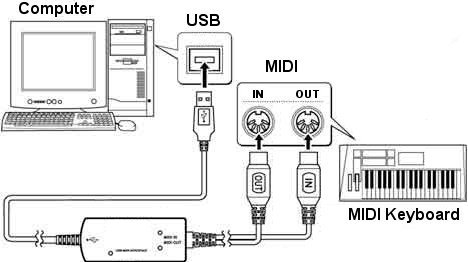
The MIDI signal from the computer interface (in this case
a USB interface) goes to the MIDI IN and MIDI OUT of the
keyboard, through a USB to MIDI adapter, forming a perfect
loop to record and playback from the computer. If the
keyboard has a thru port you can cascade any other's
instrument MIDI IN port to this port and the sequencer
will direct any data this instrument is prepared for. By
feeding MIDI Thru jacks to MIDI In jacks, we can send the
computer data to several slaves.
However, as we aII know, MIDI is not perfect; some
instruments do not provide MIDI Thru jacks, and in any
event, this way of interconnecting devices only works for
a limited number of keyboards (as the MIDI signal goes
through multipIe Thru outputs, it can be the victim of
"data distortion" and delays due to technical limitations
of the MIDI interface).
For the microphone look for a line input of your
computer's audio card and connect the microphone to this
input. If more microphones are needed you need to get a
mixer preferably with phantom power supply for when the
need of more sofisticated setups come.
Using It
Congratulations! Everything is in place and ready to go.
Dig out the sequencer's owner manual and start putting it
through its paces. Remember to set your MIDI channels and
modes (omni-poly-mono) correctly, and you're off.
Not everything will go smoothly, of course. You should be
prepared for surprises (both good and bad), and some
frustration. Remember those times your tape recorder
wouldn't record until you noticed that you were in sync
mode? Those kinds of "beginner's mistakes" are very common
when using MIDI.
MIDI has so many variables that things seldom work
perfectly from the beginning. You will have to make sure
that your controllers are set so that they can talk to the
sequencer, and you might occasionally run into a hardware
or software bug. These are part of the deal, just like a
drop-out on regular tape. The important thing is not to
give up, or let frustration take the lead. Come back later
with a fresh outlook, study the manual a little further
and experiment.
Once you begin to use the MIDI studio, you'll realIy start
to appreciate how much it simplifies and speeds up the
composition process. For years, I've been waiting for the
tapeless studio, and it's finally here. If you've been
looking for something truly new in musical electronics,
this is it... recording will never be the same again.
|