
Midi Electronic's
Now we focus in the electronic part of the interface. In the next chapter we deal with the protocol.
MIDI means Musical Instrument Digital Interface.
- First of all MIDI is an interface. I’ll repeat it. It’s an interface. It’s not an instrument of any sort. In my long walking on these sands of MIDI I have heard many people confusing the instrument with the interface saying things as “if it has no midi then It can’t sound”. Silly as it seems many people still thinks that it's the MIDI which produces sound.
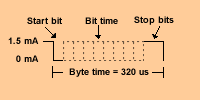
- Second, the interface is a serial one, somehow looking alike RS-232 with one start bit, 8 data bits and two stop bits (some literature specifies one stop bit). A serial interface will be always cheaper than a parallel one and this was one of the design decisions they have to consider because the hardware was bulkier and more expensive on those days than today.
- Third, unlike RS-232 which uses bipolar voltage to deal with ones and zeros the MIDI interface uses a 1.5 mA current loop; this simplyfies the design to fewer electronic parts.
It runs a what seems an odd speed of 31.25 kilobaud. (Here we can talk of bauds and bits interchangeably since the baud contents 1 bit, although one unit measures the transmission rate and the other measures the information rate) But 31.25 KBaud is not so strange when you consider that the popular 6850 Asynchronous Communication Adapter running at 2 Mhz and set for a divide by 64 operating mode deliver if you make the mathematics... yes your right! 31.25 Khz!

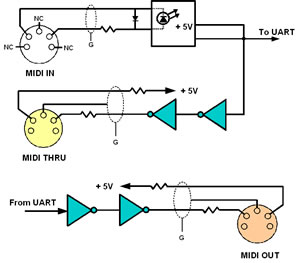
The interface has an opto-isolator at the receiving end. You may ask why an interface supposed to be cheap had such a high tech requirement? The answer lies in the ever-present problem of the audio equipment – ground loops - this prevents digital noise from showing up when digital and analog signals are mixed together in the same box and then interconnected with other box. Even MIDI, if not handled properly, can fall prey.
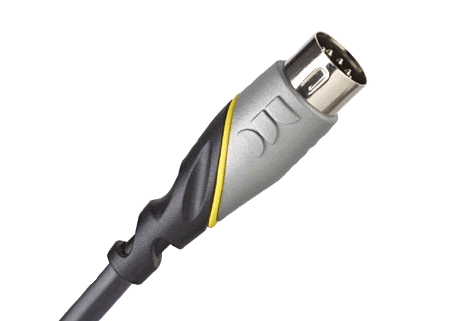
Connectors are a 5 pin DIN types. This type of connector was so much used in those days that they were pretty cheap and easy to get. Only pins 4 and 5 are used to carrying the current loop. Pin 2 is connected to the cable shield to ground (more on this later).
For cabling the specification call for a twisted pair cable (again to avoid crosstalk) not greater than 15.24 mts. (50 feet). The experience dictates that the length must be shorter than this, say about 8 mts. (26 feet) or shorter if possible. The shorter, the better.
Be warned again those commercially available cables designed for audio use. These might work but it’s not a guarantee. They may induce ground loops and audio hum. How? Well if you are electronic savvy and curious enough then read on.
The problem arises because two individually design faults meet together. Most DIN connectors soldered to PC (printed circuit) boards have the pins soldered to a large land area (no problem, so far). On some boards, however this land area happens to be the system ground and on most DIN’s the mounting tabs are electrically connected to the shell (here the problem begins to show).
On the other hand the DIN audio cable have pins connected on a one to one basis (again no problem) but have their shells connected together by means of the cable shield. When two pieces of equipment have their shells grounded and are connected with this cable the result is an instant ground loop (devices are connected to a common ground through different paths).

Fig 2
Looking at Fig 2 notice that none of the pins on the MIDI In connector are grounded, while on MIDI Out connector only pin 2 is grounded. This way a common ground is avoided and ground loops eliminated.
Not every instrument have to have all these connectors (In, Out, Thru). Some keyboardless voice expanders may have only the IN connector. Some others like a keyboard controllers and timing sources may have only the OUT. Most high tech equipment includes both and a third THRU connector which is really a buffered IN connector as the diagram shows.
Some very high tech and expensive equipment may have several IN's and several OUT's and in these boxes the handling of the MIDI stream is trickier than you might think. In future chapters I’ll explain this in detail. |